You have a meter for power, water and gas. Where is the one for data?
MeterMyData is a free meter for your data. It runs on your machine, shows how much of what you paid for was a repeat, and uploads nothing.
Runs in your browser. No install, no account, no upload. Takes about a minute.
Prefer the command line?
Run it with nothing after it and it asks three questions: what to meter, which service, done.
Windows PowerShell: use npx.cmd metermydata, or run Set-ExecutionPolicy -Scope CurrentUser RemoteSigned once.
Three meters. One missing.
Metered at the service entrance.
Metered at the curb.
Metered at the regulator.
Billed by volume. No meter on your side. Repeats arrive and get counted like anything else.
Three ways in. Pick one.
Same meter, same numbers. Start with the browser if you are not sure.
No install. For anyone.
Your browser can save a recording of everything a page downloaded (a HAR file). Drop that recording on the meter and it tells you how much you had already received.
Not sure how to get one? The meter page walks you through it, and has a sample recording to try first.
Live traffic, one command
npx metermydata --allow api.openai.com
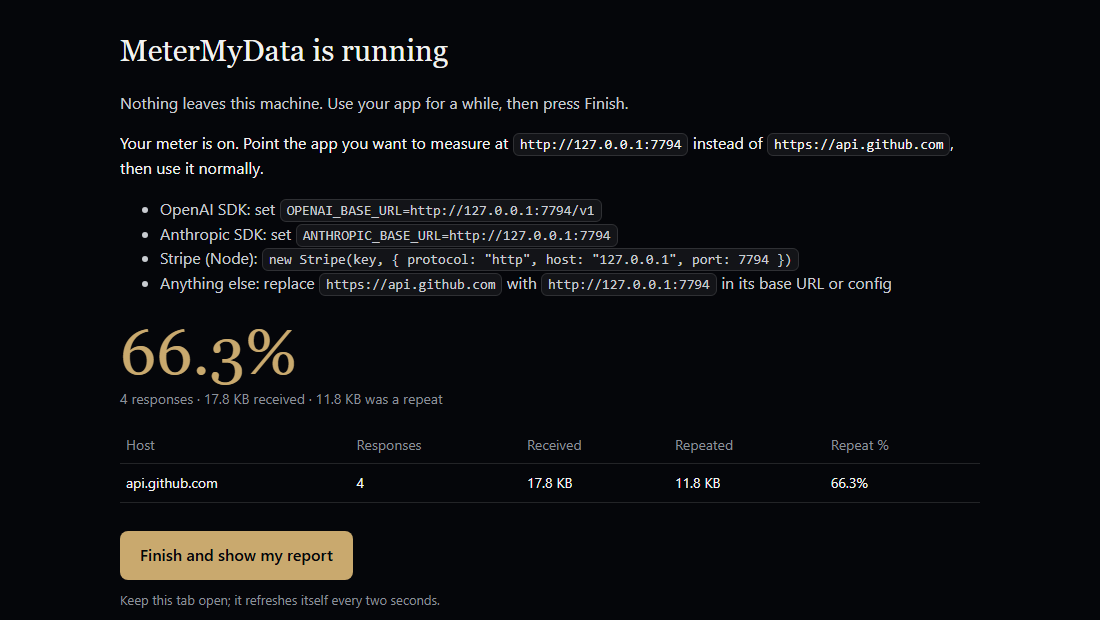
Then point your app at http://127.0.0.1:7777 instead of the API. Every byte streams through untouched; a copy is metered on your machine. 127.0.0.1 only, named hosts only.
OpenAI SDK OPENAI_BASE_URL=http://127.0.0.1:7777/v1, Anthropic SDK ANTHROPIC_BASE_URL=http://127.0.0.1:7777, Stripe Node host 127.0.0.1, port 7777, protocol http. Several hosts at once: http://127.0.0.1:7777/https://host/…. Saved files too: npx metermydata har traffic.har. While it runs, http://127.0.0.1:7777/__meter shows the live count and a Finish button that opens your report.
Node 20 or newer. Windows PowerShell: npx.cmd metermydata, or run Set-ExecutionPolicy -Scope CurrentUser RemoteSigned once. Not for hostname-signed requests such as AWS SigV4.
Read it. Build it. Check it.
The whole meter is public: the chunking (mmd-cdc-v1, frozen), the hashing, the report, the tests. Nothing in it phones home, and you can read that for yourself.
Package metermydata on npm, source and releases on GitHub, under the MeterMyData License v1.0.
No browser extension, no intercepting proxy, no account. The meter reads; it changes nothing about your traffic.
First readings
Share of delivered bytes that had already been delivered, in our own test traffic. Percentages, not savings. Readings people share from their own meters are listed, after review, on the Repeat Index.
Same day's live bench read Stripe at 88.4%. All runs at a $1/MB test price. Chunk size moves the number (about 81% at 36-byte chunks, 41% at 2 KB), so every report prints its chunking version.
A meter reads. It does not write the bill.
What leaves your machine
- Nothing, while you measure.
- Waitlist: your email, plus one percentage if you tick it.
What is not in it
- Accounts, telemetry, uploads.
- Settlement, payment, encryption.
- Bodies on disk, CA certificates, admin rights, proxy changes.
Questions
- What is MeterMyData?
- A free meter for data. It runs on your machine and shows how much of the data you received was a repeat, the way a power, water or gas meter shows what was delivered. It uploads nothing.
- What is a HAR file, and how do I get one?
- A HAR file is a recording your browser can save of everything a page downloaded. In Chrome or Edge: open DevTools, Network tab, right-click the list, "Save all as HAR with content". Firefox: Network, gear icon, "Save All As HAR". Safari: Network, Export. Then drop the file on the meter page. A HAR can contain credentials, so treat it like one and keep it on your machine.
- Can I use it without installing anything?
- Yes. The browser meter at metermydata.com/app runs in your tab. The command-line version needs Node 20 or newer and runs with npx metermydata.
- Which APIs does it work with?
- Any HTTPS API host you name after --allow: OpenAI, Anthropic, Stripe, GitHub, Vercel and others. Your SDK points at the local forwarder instead of the API. It does not work with hostname-signed requests such as AWS SigV4.
- Does it tell me how much money I can save?
- No. It reports repeated bytes as a percentage, per host. Billable repeated bytes appear only after you confirm how your provider bills, and potentially addressable spend only with a rate you confirmed. It never calls a repeat a saving.
- What leaves my machine?
- Nothing while you measure. Sharing a reading with the Repeat Index is opt-in and shows you the exact numbers first: host names, counts, bytes and percentages, never URLs or contents. The waitlist takes your email, plus one percentage if you tick it.
- What does it cost?
- Nothing. The meter is free. The waitlist is for a future product.
Tell me when I can stop paying for repeats
The meter is free and ready today. This list is for what comes next: paying only for the bytes you have not seen before. Leave an email and we write once, when that exists.